Overview
TokenIDP brings the main identity-provider jobs into one deployable platform: tenant isolation, application registration, token issuance, user management, and operator controls. The intent is to keep OAuth/OIDC behavior standard while still giving administrators a practical place to manage tenants, users, roles, keys, and client settings.
Core concepts
- Tenant: the isolation boundary for configuration, applications, users, roles, and keys
- Application (Client): the OAuth or OIDC client registered to request tokens
- User: the authenticated subject
- Role: a grouping of permissions used by admin and business policies
- Scope: a delegated permission requested during authorization
- Resource: the API or service protected by the issued token
- Signing Key: the private key or certificate that signs tokens
- JWKS: the published public keys used for verification
- Issuer: the canonical URL that identifies the TokenIDP instance
How TokenIDP fits
TokenIDP sits between Applications and protected APIs. A typical request moves through the system like this:
- Applications redirect users to TokenIDP or authenticate directly with allowed grants.
- TokenIDP validates the request in Tenant context.
- TokenIDP issues tokens signed by the current Signing Key.
- APIs validate the token against the Issuer and JWKS.
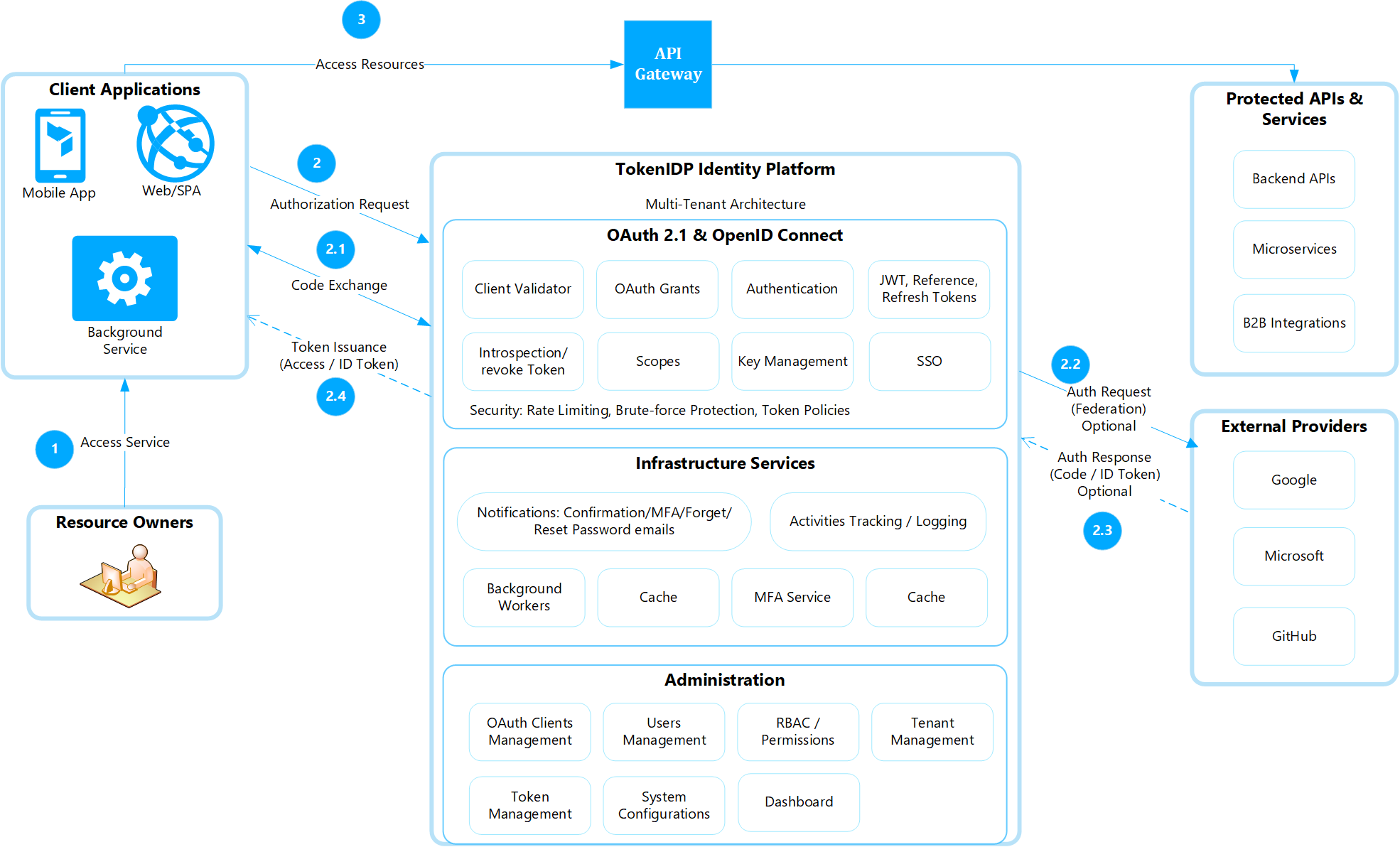
What TokenIDP Does
At runtime, TokenIDP issues Access Tokens, Refresh Tokens, and ID Tokens for registered Applications inside a Tenant. It also publishes the metadata and endpoints that OAuth and OIDC clients expect, including discovery, JWKS, /authorize, /token, /userinfo, /revoke, /introspect, /device_authorization, /backchannel_authentication, and /logout.
Current Deployment Shape
The current product is split into two deployable surfaces:
- TokenIDP backend: ASP.NET Core host providing OAuth 2.1, OpenID Connect, admin APIs, and authentication workflows.
- Admin Portal: React single-page application using Authorization Code Flow with PKCE against TokenIDP.
The TokenIDP source repository is available at the TokenIDP GitHub repository.
The backend has been validated against:
- SQL Server and PostgreSQL databases
- fresh database bootstrap on first run
- older-schema migration upgrades
Treat these as the currently validated operational assumptions unless your environment has been tested separately.
Suggested Reading Path
- Start with Getting Started.
- Configure browser and API origins in Configure CORS.
- Review the deployment guidance for the backend and React portal hosting model.
- Choose the OAuth flow that matches your client type.
- Use the Reference section for exact endpoint behavior and field definitions.
- Review Security Model before production go-live.
Example
curl https://id.example.com/.well-known/openid-configurationExpected result: a JSON metadata document listing the Issuer, authorization endpoint, token endpoint, JWKS URI, supported grant types, and supported scopes.
Common Pitfalls
1. Treating all client types the same
Different OAuth clients have different security requirements.
Example:
- SPA/mobile apps = public clients
- cannot safely store secrets
- should use PKCE
- need strict redirect URI validation
- Server-side apps = confidential clients
- can securely store client secrets
2. Reusing development signing keys in production
During development, teams often use temporary/self-generated signing keys.
Using those same keys in production is risky because:
- they may already be exposed
- they may be weak or temporary
- token trust can be compromised
Production environments should use dedicated, secure signing keys/certificates.
3. Exposing overly broad scopes such as api.full_access to every Application
OAuth scopes define permissions.
Bad example:
- every app gets:
api.full_access
Better approach:
- least privilege
- only required scopes per application