Device Code
Authenticate devices with limited input capability by splitting the user interaction across two devices.
Audience: Developers, CTOs
Read this guide when building TV, console, kiosk, or CLI experiences that cannot host a standard browser login.
Prerequisites
- Application enabled for
device_code- A user-facing verification page strategy
- Polling logic with backoff in the device client
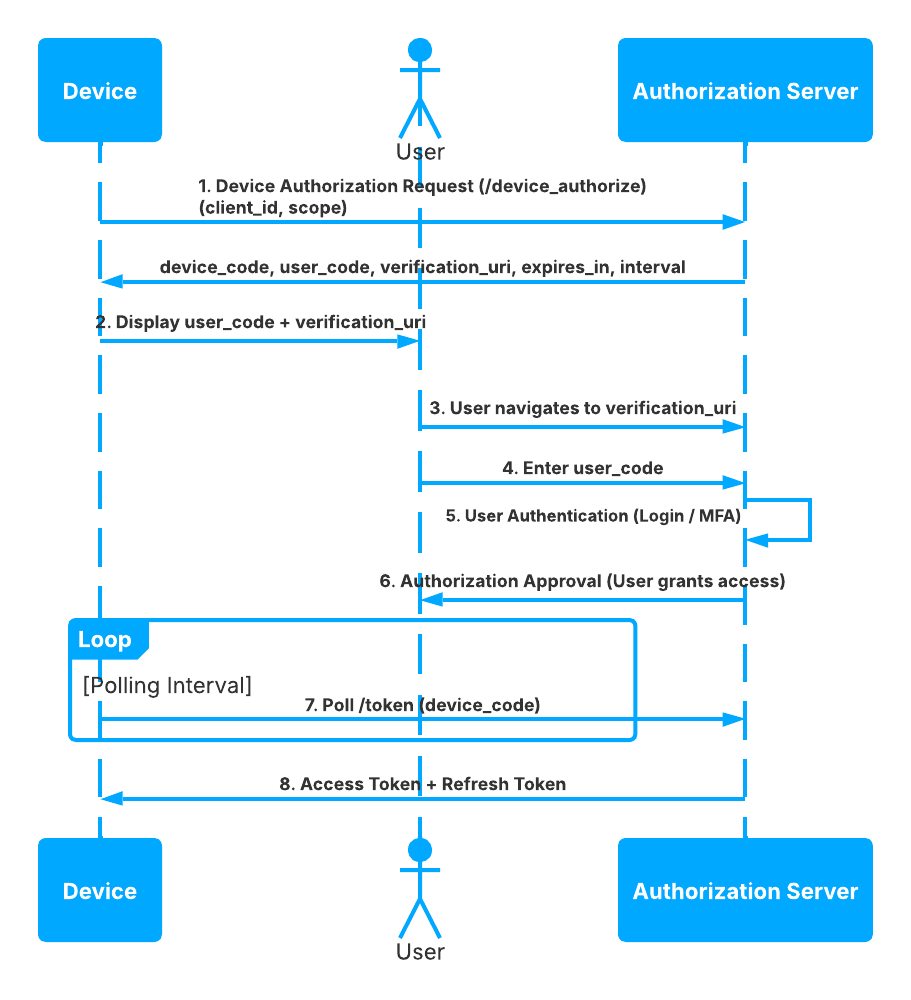
Step-by-Step Sequence
- The device posts to
/device_authorization. - TokenIDP returns a
device_code,user_code, and verification instructions. - The device shows the
user_codeto the user. - The user completes authorization on a secondary device.
- The device polls
/tokenwithgrantType=device_code. - TokenIDP returns tokens after approval.
Working Example
Example Device Authorization Request
curl -X POST https://localhost:5001/device_authorization \
  -H "Content-Type: application/json" \
  -d '{
    "client_id": "tokenidp-tv-app",
    "scope": "openid profile api.read",
    "device_metadata": "living-room-tv"
  }'
Example Token Polling Request
curl -X POST https://localhost:5001/token \
  -H "Content-Type: application/json" \
  -d '{
    "grantType": "device_code",
    "clientId": "tokenidp-tv-app",
    "deviceCode": "dvc_01HQW6J2Q8N2K7P8A1J2M3N4P5"
  }'
When to Use
- Smart TVs
- Command-line tools
- Shared-display devices
When Not to Use
- Normal web applications that can use Authorization Code + PKCE
- High-frequency polling environments without rate control
Security Notes
- Keep the device polling interval conservative.
- Expire unused device codes quickly.
- Treat the user code as short-lived and single-purpose.
Common Pitfalls
- Polling too aggressively and creating avoidable load.
- Displaying the wrong verification URI or stale user code.
- Using Device Code when a normal browser session is available.
Troubleshooting Tips
- If polling always fails, verify the user actually completed the approval step.
- If the user code is rejected, check code expiration and tenant mismatch first.